
Blog
Ranking in ChatGPT: How to Build Brand Visibility in AI Search
Imagine you need to take a client out for a business dinner. The catch: it has to be in their hometown, a city you don't know well.
Just a few years ago, the process would have looked like this: you open Google and type “restaurant Lisbon business dinner.” You get a list of results. You open a map and check which restaurants are near your hotel. Then you start going through websites (to check the menu and the general vibe) and reviews (so you don't step on a landmine). After a dozen or so minutes and a dozen or so browser tabs, your choice narrows down to a few solid contenders, and you can safely pick one on gut feeling.
And today? You open ChatGPT or Gemini and type in every condition at once: “I'm looking for a quiet restaurant in central Lisbon for a dinner with an important client. It should have vegetarian options, be within a fifteen-minute walk of Hotel X, and have good reviews from people who've hosted business meetings there.”
The task itself hasn't changed, but the machine now handles a big chunk of the work. The model refines your criteria, searches sources, combines the information, and presents a few options. The user (that's you) might only visit the restaurant's website once you want to see the menu or book a table. Or you might never visit it at all.
A few years ago, I wrote about the zero-click phenomenon. Even back then, Google was trying to satisfy user needs without ever sending them off its own page. Movie showtimes, flight connections, hotel prices, business hours, or an answer pulled straight from an article — they all appeared directly in the search results. And that was before the age of AI summaries!
In 2024, according to a SparkToro and Datos study, 59.7% of searches in the European Union ended without a click on a result leading outside Google. The user simply ended the session or changed their query.
AI summaries only amplify this phenomenon. Pew Research Center analyzed nearly 69,000 searches performed by 900 American adults. When an AI Overview — the AI-generated summary shown above the regular search results — appeared on the page, users clicked a traditional result only 8% of the time. Without an AI summary, they did so 15% of the time. And here's another important point: Google's AI summaries do include a link to the source (so you can verify for yourself whether the AI is making things up). People clicked it… less than 1% of the time.
At the same time, more and more people are starting their search for information outside Google. According to a Mediapanel study, in June 2025 9.33 million Polish internet users used ChatGPT — 31.37% of the online population surveyed. The largest group were users aged 25–34: people who aren't just learning and experimenting, but also working, buying, and making business decisions.
So when we talk about ranking in ChatGPT, it's not just about clicks anymore. Increasingly, we're fighting simply to have the brand show up in the response the user is using to build their shortlist in the first place. Nobody picks you if you're not even on that list.
AI is changing the top of the funnel and compressing the middle
Searching with Google required a certain amount of knowledge going in. Above all, it required the ability to name the solution. Let me walk you through an example.
Imagine you run a small advertising agency. Your problem is that clients send you inquiries over email, Instagram, WhatsApp, and LinkedIn. On top of that, several people inside the agency answer inquiries — and it often happens that person A doesn't know person B already replied to a client's message.
The solution to your problem is a decent CRM system. Or maybe a project management system if, beyond tracking correspondence, you also want to track project progress. But you need to know that before you can go find various CRM or project-management systems on Google. It's not so bad when the CRM vendor's own site has articles about your exact problem — then you'll somehow find the solution. But what if the descriptions focus purely on product features? That's the case in most non-marketing industries: you learn what kind of mount a camera tripod has, not whether it'll fit your studio or work for recording podcasts.
In a conversation with an LLM, you can start by describing the problem in your own words — your needs, your symptoms. The model will ask you follow-up questions:
- Does the difficulty show up while winning clients, or after the contract is signed?
- Should the client only see status updates, or also comment on and approve materials?
- Does the team need time tracking, invoicing, and billing?
- How many projects does it run at once, and what's the budget?
Based on your answers, the model can narrow your need down to a lightweight project-management system with a client portal, or just a CRM. You start the conversation by describing the problem — clumsily, probably, something like “our agency is a mess” — and you end up with a named category, and even recommendations for specific tools!
So the top of the funnel is changing. The LLM helps the user notice the problem, organize the symptoms, and connect them to a category of solutions. A brand can enter the conversation before the potential customer even knows the name of the product they need.
But it's the middle of the funnel that shrinks the most. In the past, a user would open several to a dozen or so tabs, reading articles, forums, reviews, and comparisons. They'd manually pick out the recurring arguments and build a shortlist themselves. Now, the LLM does a large chunk of the synthesis and initial filtering.
The old funnel looked roughly like this:
need → Google search phrase → list of results → several sources → comparison → shortlist → brand's website → decision
The new path is often shorter:
symptoms → conversation with AI → naming the need → criteria and shortlist → verifying the brand → decision
Increasingly, the search work itself is done on the user's behalf by a model with access to a search engine: it can send several queries, review the sources, and hand over the result. If your brand doesn't show up in the set of material that synthesis is built from, it has little chance of making the shortlist.
What does “ranking in ChatGPT” actually mean?
The term sounds familiar because we borrowed it from SEO. In Google, you can roughly track a page's position for a given phrase. Language model answers are far less stable. They depend on how the question is phrased, the conversation's context, location, the tools available, the sources used, and the current version of the model.
That's why brand visibility in LLMs is best tracked along three dimensions:
- Mention — the model names the brand in its answer.
- Citation — the answer links to the brand's page or names it as a source.
- Recommendation — the brand makes it onto the shortlist of solutions matched to the user's situation.
Each dimension carries different value and can occur independently of the others.
- A mention can build brand awareness, and it can also bring traffic that… isn't attributed to any specific source. It happens to me all the time: the model names a tool, and I open a new browser tab and type its name in myself. Analytics will show my visit as “from Google,” or even as “direct traffic.”
- A citation can bring traffic — and traffic you can actually measure, because if an LLM shows me a fragment of an article, I'll probably click through to read the whole thing. But careful: only when the quoted fragment doesn't fully answer my question (remember, only 1% click the links in AI summaries?).
- A recommendation influences the decision directly, even when the user never clicks a single link.
In industry discussions, you'll run into several names for the practice of building this kind of visibility:
- GEO – Generative Engine Optimization,
- AEO – Answer Engine Optimization,
- LLMO – Large Language Model Optimization,
- AI SEO — or simply AI ranking.
Arguing over which acronym is best doesn't add much to your day-to-day work. They all lead to the same question: what do you need to do so the system can find information about your brand, understand it correctly, and have a reason to use it in its answer?
Where do ChatGPT and other AI tools get their answers from?
An LLM has two layers it draws on for knowledge about your brand. The first — and the one that dominates popular thinking — is that the LLM “knows” everything thanks to its training. If you're a well-known brand or a celebrity mentioned repeatedly across the internet, that's true. The problem is that data baked in during training can't be updated just by publishing one article on your site today.
The layer that's far more practical for a marketer is the second one: searching for and retrieving information while generating the answer. Systems equipped with this capability — including ChatGPT Search, Perplexity, Google AI Overviews, AI Mode, or Microsoft Copilot — can pull from live pages, search indexes, and additional databases.
Google describes a mechanism called query fan-out used in its AI features: the system breaks a complex question down into several smaller queries covering different aspects of the problem. For a question about a quiet restaurant, it might separately check location, menu, reviews, opening hours, and general vibe — then merge the results into a single answer.
This has two important consequences. First, classic SEO still affects visibility in AI, because a page still has to be discovered, read, and indexed. Second, a single “main keyword” loses some of its old power. A brand needs to be well described across the whole web of topics, questions, use cases, and relationships that a model might trigger while searching for an answer.
The rest of the work can be summed up in five verbs: find → understand → confirm → cite → measure.
Step one: get your Google visibility and technical foundations in order
Before you tackle ranking in ChatGPT and other LLMs, you need to check whether your brand's traditional Google ranking is in good shape. Why? Because features like featured snippets, Google Maps, the Local Pack, and knowledge panels predate generative answers. They still occupy valuable real estate in Google, and they show whether the search engine correctly understands a company, a person, a product, or a location.
Featured snippets
A featured snippet pulls a fragment from a page and displays it in a highlighted spot in the results. Google picks the page and the fragment on its own, so there's no submission form or tag that guarantees you'll get one.
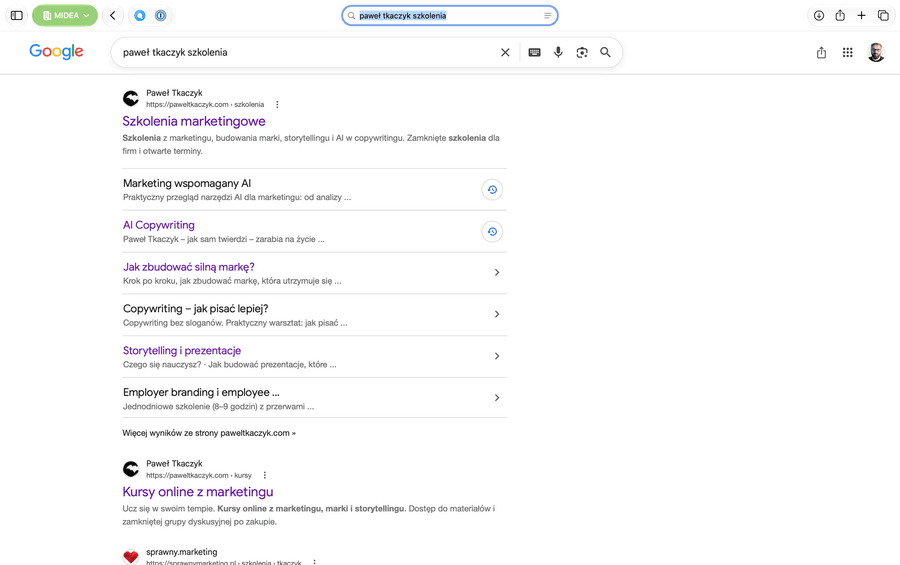
You can, however, make it easier for Google to pick you:
- build headings around the actual questions users ask;
- put a short, self-contained answer directly under the heading;
- use a numbered list when the question is about steps;
- use a clear table when the user is comparing parameters;
- take care of indexing, internal linking, and semantic HTML;
- cite your sources and update information that goes stale quickly.
The fragment has to make sense on its own once it's pulled out of the rest of the article. That same quality also makes it more useful to a system building an AI answer.
There's also no special schema.org type for featured snippets. What you should watch out for instead are the directives that control previews. nosnippet blocks your content from being used in regular and featured snippets, data-nosnippet excludes a marked section of the page, and a low max-snippet limits how much text Google can display. If you want to show up in answers, don't slap these muzzles on by accident. Google covers the rules and controls in its featured snippets documentation.
Google Maps and the Local Pack
For a local business, the foundation is a verified, up-to-date Google Business Profile. The name, main category, address or service area, phone number, hours, services, photos, and reviews should all describe the same business the user sees on your website.
Google names three main groups of signals for local results: relevance, distance, and prominence. You can't change distance with good SEO copy. What you can do is:
- describe your category precisely,
- keep your data complete,
- earn genuine reviews,
- build your business's presence in credible local and industry sources.
Your real business name works better than a name stuffed with keywords. “Rose Garden Florist” should stay “Rose Garden Florist,” instead of turning into “Rose Garden Florist – cheap wedding bouquets downtown same-day delivery.” Google also bans profiles for virtual offices and buying or selectively soliciting positive reviews. You can neutrally ask every real customer for a review and respond to both praise and criticism. A genuinely good idea here is a QR code that takes people straight to the page where they can leave you a review.
Google's local ranking guidelines don't offer any paid shortcut to the top of the organic Local Pack.
If a business has several locations, it's worth building a separate, indexable page for each real one. Put matching contact details, hours, service scope, directions, and the correct LocalBusiness subtype on it. Structured data helps tie the facts together, but ranking is still driven by relevance, distance, and prominence.
The knowledge panel
A knowledge panel appears when Google recognizes a person, organization, or other concept as an entity and can piece together information from multiple sources. What helps here:
- an unambiguous “About us” or “About the author” page;
- a consistent name and description of what you do;
- structured data for
Organization,Person, andProfilePage; - a
sameAsproperty pointing to your official profiles; - independent, credible publications confirming the key facts;
- an up-to-date Google Business Profile, if the brand operates locally.
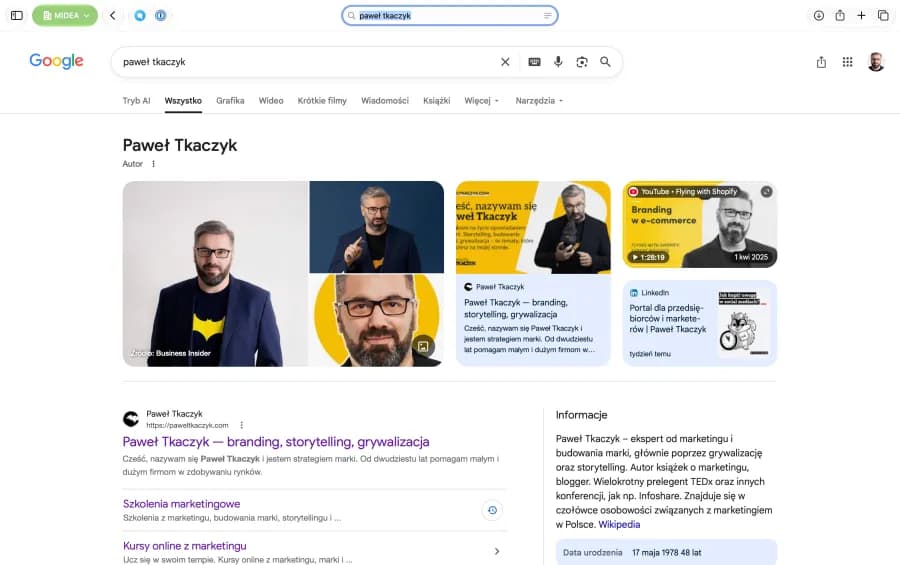
If a panel already exists, the person or organization it represents can claim it and suggest corrections. Simply adding schema or a social profile, though, doesn't force Google to create one. Google assembles the picture of an entity from many consistent signals.
After verification, the claimant can propose changes, but the final content of the panel remains up to Google. Back up every correction with a public source. When an incorrect description comes from an external site, fix that source too — otherwise the mistake can resurface the next time the data gets reprocessed. Google describes the knowledge panel claiming process.
Ask an agent to audit your site's visibility
Before you start creating special content for AI, check whether crawlers can even reach what you already have. An agent with access to the internet and your site's code can handle a good chunk of the technical audit.
Ask it to check:
- server responses and redirects;
- the
robots.txtfile and the sitemap; - the
noindex,nosnippet, and canonical directives; - titles, meta descriptions, and heading structure;
- internal linking — and, after running a full site crawl and comparing it against the sitemap, orphaned pages too;
- whether the most important content is accessible in the HTML;
- structured data and whether it matches the text visible to humans;
- access for Googlebot, Bingbot, OAI-SearchBot, and PerplexityBot;
- inconsistent information about your name, author, offering, address, or brand profiles.
A sample brief could look like this:
Run a public audit of [URL] for Google visibility. Check the homepage and the most important subpages, robots.txt, the sitemap, indexability, canonicals, metadata, headings, internal linking, and schema.org data. Also assess whether the brand information forms a consistent picture of the entity. Don't guess. For every issue, cite the page URL or the code snippet that proves it. Present the results in a table: issue, evidence, impact, priority, and recommended fix. Separate observations that can be made publicly from data that requires access to Google Search Console or analytics.
That last sentence matters a lot. An agent looking at your public site doesn't know which queries it shows up for, its impression counts, its CTR, or any issues visible only inside owner-only dashboards.
Which brings us to the next topic.
How do you feed an agent data from Google Search Console?
You have three reasonable options. The choice mostly depends on whether you're doing a one-off audit or building an ongoing process.
Need | Access method | Difficulty level |
|---|---|---|
One-off analysis | CSV, Excel, or Google Sheets export | low |
Manually browsing a few reports | Separate account with limited browser access | low to medium |
Ongoing monitoring | Search Console API with read-only access | medium to high |
The simplest method needs no integration at all. Export query and page data from the Performance report to CSV or Google Sheets. Then hand the file to your agent and ask for an analysis. To start, it's worth exporting at least three months of data covering query, page, clicks, impressions, CTR, and average position.
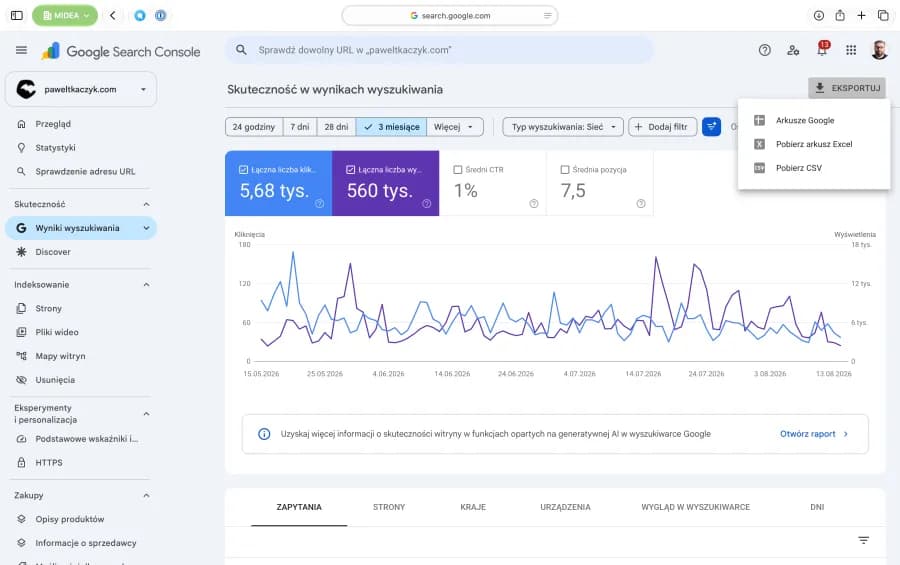
A standard report export contains up to the 1,000 top rows visible in the report. On a larger site, that means the agent sees the most important slice of queries but might miss the full long tail. Mention that in your brief. The safest approach is to hand over three separate exports: queries, pages, and dates with a period-over-period comparison. Google documents the export scope in the Search Console help center.
The agent can then spot:
- pages with high impressions and low CTR;
- queries where the content misses the user's intent;
- pages competing for the same queries — provided you supply the query-to-page relationship pulled via the API or obtained by filtering queries in the interface;
- topics gaining or losing visibility;
- questions that deserve their own, citable answer;
- differences between branded and non-branded traffic.
For ongoing work, access through the Search Console API or a ready-made integration is more convenient. A step-by-step guide is beyond the scope of this article, but Google's documentation covers everything you or your webmaster need to know.
The third route uses an agent operating inside a logged-in browser. You make sure your ChatGPT or Claude has browser access, log in to your Google account, and let the agent take control. It clicks around and reads whatever it needs. Pay attention to security here — a browser agent has exactly the same permissions you do, so if your Search Console has more than one client attached (say, you're an agency) or you're not entirely sure what you're doing, at the very least set up a separate Google Search Console account, log in with that, and let the agent work within those limits. An instruction written into the prompt helps steer the agent, but only actual system permissions genuinely restrict what it can do.
My preferred method is the API. Through it, an agent can analyze Search Analytics, sitemaps, and URL Inspection data: a page's indexing status, blocks, the canonical Google actually picked, the last crawl date, and detected rich results. The URL Inspection API shows the version known to the index, not a live test of the current page. That's why dashboard data should complement a public code audit, not replace it.
The simplest rule is: first audit — CSV; interface analysis — separate limited-access account; ongoing monitoring — read-only API.
Step two: build an unambiguous entity
An entity is a recognizable object: a person, a company, a brand, a product, an event, or a place. “Paul Skah” can be just a string of characters, but for the system, it should mean a specific person connected to certain books, the company MIDEA, speaking topics, an official website, and social profiles.
The model has to settle several things:
- What is the brand called? For me, that's Paul Skah.
- What category does it belong to? For me, Paul Skah is a person.
- What does it offer and who does it help? I have several pages describing my services, training programs, and so on.
- Where does it operate? I'm not a local business, so you won't find me on Google Maps.
- Which people, products, and organizations are connected to it? I've written three books, each with its own page.
- Which profiles and pages describe the same object? I have a
sameAstag that points to my social media profiles, and also to my Wikipedia entry (yes, I have one). In August 2026, Google also started allowing social profiles to be added to Google Search Console (not all of them yet — currently Instagram, TikTok, YouTube, and X) — it's worth doing. - What independent sources confirm this information?
Start with your own website. It should have an unambiguous about page for the company or author, full contact details, a clear category description, and links to official profiles. Information repeated in the footer, the contact page, the bio, and the structured data all needs to match.
Schema.org helps pass some of this information along in a machine-readable format. For a company, Organization or LocalBusiness will usually do; for an author, Person and ProfilePage; for content, Article or BlogPosting; for navigation, BreadcrumbList. The sameAs property can connect the entity to official profiles and other pages describing the same object.
Structured data should reflect the content users can actually see. Google may ignore awards, reviews, or relationships added only in the code, and a mismatch can violate its structured data guidelines.
Does every company need a Wikidata entry?
Wikidata is an open knowledge graph where information is recorded as relationships: a person is the author of a book, a company is headquartered in a city, a product belongs to a brand. That format makes unambiguous entity recognition easier. Simply creating a Wikidata item, though, doesn't provide a documented advantage in ChatGPT.
A Wikidata entry makes sense when a person or organization meets the project's notability criteria and can be described using serious, publicly available sources. Every significant claim should lead to a source. A promotional listing based solely on the subject's own website can be challenged or deleted.
If your entity meets these conditions:
- check whether an item already exists so you don't create a duplicate;
- add a concise label and description that distinguishes the entity from others with a similar name;
- fill in properties such as official website, industry, headquarters, authorship, or related organizations;
- back up significant claims with independent sources;
- link the item to other existing entities.
Treat Wikidata as one possible piece of organizing your brand's identity, when the grounds for it exist. Before that, take care of a consistent website, structured data, industry profiles, and independent publications.
Step three: publish content worth using in an answer
A model building an answer needs more than a generic claim that a company is a “quality leader.” It's looking for fragments that help answer a specific question.
The most useful things are:
- clear definitions;
- short answers to specific questions;
- step-by-step procedures;
- comparison tables;
- original data and research findings;
- documented methods and experiments;
- case studies with real numbers;
- expert commentary;
- information updated along with a change date.
The study that kicked off the popularity of the term GEO found, in controlled experiments, that adding credible sources, concrete statistics, and expert quotes increased content visibility in generated answers. Treat the result as a directional signal rather than gospel, since the experiment doesn't model every modern system or every industry.
Good content should be easy to quote without losing its meaning. If a heading asks a question, the sentences right below it should answer it. Only after that should you add context, backstory, and exceptions. Readers appreciate a quick answer, and a system finds it easier to match the fragment to the right question.
The biggest advantage comes from material your competitors simply can't copy: your own data, hands-on project experience, an original framework, a well-documented experiment, or a collection of real examples. Another piece summarizing ten other people's articles adds to the internet's word count but rarely adds to its knowledge. Save that kind of content for social media.
Step four: make sure others confirm your position too
Your own website says who you want to be. The rest of the internet shows who your surroundings actually think you are.
Industry publications, podcasts, conferences, reviews, category-relevant directories, author profiles, and expert commentary all help systems confirm the link between a brand and a topic. What matters is the quality and context of the mention. A random business directory contributes less than an article in a respected outlet where an expert explains a problem within their specialty.
I make a point of speaking to the media as a way to earn citations. Here are some examples:
- My comment on Forbes' ranking of the 100 most valuable women's personal brands (this one happens to be behind a paywall)
- How to read a personal-brand-value report, written for Wirtualne Media
- My comment on an article about funny company and brand names, for Bankier.pl
A while back, writing about a blogger's personal brand, I used the term content graph: show me who publishes you, and I'll tell you who you are. In the world of generative search, that rule takes on new meaning. An LLM can base its answer on an external source that confirms a brand's expertise, even without ever citing the brand's own website.
So build repeatable, genuine associations:
brand → category → problem → proof → external source
Buying fake mentions, faking reviews, and stuffing your company name into random pages just adds noise. Credibility grows when independent sources have a real reason to write about your brand.
Step five: measure your visibility in answers
One question asked once in ChatGPT gives you an anecdote. A meaningful measurement needs a fixed set of prompts and a repeatable process.
Build a list of 20–30 questions across a few categories:
- branded: “What does brand X do?”;
- category: “What companies help with…?”;
- problem-based: “I have this problem — what should I look for?”;
- comparative: “X or Y — which is better for…?”;
- recommendation: “Recommend three solutions for…?”;
- local: “Who do you recommend in [city/region]?”
Test them across several systems, since ChatGPT, Gemini, Perplexity, Copilot, and Google AI Overviews rely on different mechanisms and sources. Whenever possible, use clean sessions with no chat history. Run the same set once a month; checking random questions every day will mostly just produce anxiety.
Measure separately:
- whether the brand was mentioned;
- whether it was cited with a link;
- whether it made it into a recommendation;
- where it appeared on the list;
- how it was described;
- whether the description contains errors;
- which sources were cited;
- how it compares to competitors;
- whether traffic from AI tools and branded search volume are growing.
A spreadsheet is enough to start with. Put questions in the rows, systems and measurement dates in the columns. Record the answer, the domains cited, and a visibility score.
Once you're running more prompts, specialized monitoring tools help. They differ in which models they cover, how often they measure, competitor analysis, citation history, and price. I checked the comparison below on August 14, 2026.
Tool | What it measures | Who it's for |
|---|---|---|
Free spot-check of brand visibility | initial reconnaissance | |
Mentions, citations, share of answers, and sentiment across ChatGPT, AI Overviews, Perplexity, and Copilot, among others | solo entrepreneurs and small businesses | |
Custom prompts, competitors, citations, sentiment, and site-readiness audit | companies combining AI monitoring with classic SEO | |
Daily tracking of visibility, ranking, competitors, and cited sources across selected engines | a small team or an agency running several projects | |
Mentions and citations across multiple systems combined with SEO, YouTube, Reddit, and TikTok data | a brand that already has an SEO process and needs a wider picture | |
Share of answers, sources, sentiment, incorrect brand claims, and AI-driven traffic | a larger team or a big organization |
Prices and feature sets for these tools change fast, so check current pricing before buying. For a brand outside the biggest English-language markets, three questions matter more than the number of charts: does the tool support your local market and language, does it let you upload your own prompts from different stages of the funnel, and does it separate mentions, recommendations, and citations?
Also check how each tool gets its answers. Some query the consumer interface, others the API, and results can differ. Calculate cost for the whole setup: number of prompts × number of engines × number of countries × frequency. An ad for “50 monitored prompts” doesn't yet tell you how many actual answers your subscription covers.
An LLM visibility monitor is closer to a recurring opinion poll than to a Google ranking check. It regularly asks selected models the same set of questions and shows whether the narrative around your brand is moving in the direction you want. No tool can see users' private conversations or every single answer ChatGPT ever generates.
Don't forget data from regular search engines, either. In June 2026, Google Search Console started testing separate visibility reports for generative search features for a subset of sites, and Bing Webmaster Tools rolled out an AI Performance report showing citations and content presence in Copilot. Report availability depends on the site and the rollout stage.
A 30-day action plan
Week 1: check your starting point
- prepare your question set and run the first measurement;
- ask an agent for a public audit of your site;
- export data from Google Search Console;
- check the indexing status of your most important pages.
Week 2: fix your foundations and entity
- fix crawl blocks, canonicals, and indexing errors;
- fill out your “About us” page or author profile;
- clean up your company data and official profiles;
- add or fix the right schema.org markup;
- update your Google Business Profile.
Week 3: create one source-worthy piece
- pick an important customer question;
- prepare an answer based on your own experience or data;
- add your method, examples, and credible sources;
- build a clear structure of headings, lists, and tables;
- link the piece to your existing content.
Week 4: distribute the proof and measure the change
- share the piece with partners, media, and your industry community;
- reuse the data in your newsletter, podcast, and talks;
- check whether new citations or mentions have appeared;
- rerun your baseline question set after a month.
The next time someone asks AI for a restaurant, a system for their agency, or an expert on a specific problem, your brand will be competing for a spot on the shortlist before a single click happens. Start with one action: write down ten questions your brand should show up for, and check the answers in three systems today. That measurement will tell you whether you need to fix your foundations first, clean up your entity, create a better source, or earn more external confirmation.
Frequently asked questions
How do you rank a business in ChatGPT, step by step?
First, check whether search engines and AI bots can find and read your most important pages. Next, clean up your brand's entity: its name, category, offering, relationships, profiles, and structured data. Publish content that answers specific customer questions and includes your own data, examples, or experience. Earn credible mentions in external sources that confirm your brand's connection to the topic. Finally, regularly ask the same set of questions across several systems, and measure mentions, citations, and recommendations separately.
Does SEO still matter for ChatGPT and AI Overviews?
Yes. A system that uses search still has to discover, read, and evaluate a page first. Google explicitly recommends applying the same SEO fundamentals to its AI features: crawlability, indexing, internal linking, content available as actual text, and structured data that matches what's visible on the page.
Does schema.org guarantee AI citations?
Schema.org helps search engines understand an object's type, properties, and relationships, though it doesn't guarantee an AI citation. It delivers the most value when it confirms information that's already clearly visible on the page.
Do I need an llms.txt file?
Google states that its AI features don't require any special files or extra tags. llms.txt remains a proposal used by some tool developers, but it doesn't replace indexing, a sitemap, internal linking, or a solid robots.txt.
How do I check whether ChatGPT can visit my site?
Check whether robots.txt, a firewall, or a CDN is blocking OAI-SearchBot. OpenAI uses it to discover content that might show up in ChatGPT Search. GPTBot serves a different purpose — collecting data that can support model training. You can allow the search crawler while still blocking the training one.
Should every company create a Wikidata item?
An item should meet Wikidata's criteria and rest on serious, public sources. For a company without independent publications, a better starting point is cleaning up your own website, profiles, schema.org markup, and presence in industry sources.
How long until you see results?
Crawlers need to revisit your pages, search engines need to process the changes, and systems need to update their indexes. Some technical fixes can show results within days or weeks. Building expertise and external validation usually takes months. That's why you should start with a baseline measurement and judge the trend from a series of repeated measurements.

Newsletter
Want more essays like this one?
One useful idea at a time — on brands, choices, stories and AI. Written when there is something worth developing, not to fill a schedule.